Best Local Database for Flutter Apps: A Complete Guide

Dinko Marinac
Introduction
Updated October 2026: refreshed maintenance status for every package, Realm’s end-of-life, Drift’s stable web support, and added a quick comparison table and a Drift vs sqflite section.
When building Flutter applications with any type of offline support, choosing the right local database is crucial for performance and maintainability.
As far as persistence goes, the official docs recommend 3 choices:
-
shared_preferences (Key-value store)
-
path_provider (File storage)
-
sqflite (Data persistence)
For most of us, a combination of a local database for data and shared preferences for user settings is what’s needed.
Local databases in Flutter had their ups and downs, most notably the situation with Hive and Isar, which have been wildly popular, but left abandoned by the author and are now maintained by the community.
The default choice nowadays seems to be anything built on top SQLite (like Drift), but there is more to the choice than meets the eye. Sometimes NoSQL database is more than enough and sometimes the right choice is not to have a local database at all.
In this article, I’ll explore the top local databases, their key features, the level of support for different platforms, maintenance, and most importantly - when to choose it.
Quick Comparison
| Database | Type | Web support | Maintenance (Oct 2026) | License |
|---|---|---|---|---|
| Drift | SQL (SQLite), typesafe | Yes, stable (WASM) | Active | MIT |
| sqflite | SQL (SQLite), raw | Experimental (separate package) | Active | BSD-2 |
| Hive CE | Key-value / NoSQL | Yes | Active (community) | Apache-2.0 / BSD-3 |
| Hive | Key-value / NoSQL | Yes | Abandoned (last stable 2022) | Apache-2.0 |
| Isar Community | NoSQL | No | Bug fixes only (v3) | Apache-2.0 |
| ObjectBox | NoSQL (objects) | No | Active | Free to use, closed-source core |
| Couchbase Lite | Document (JSON) | No | Active (community) | Apache-2.0 |
| Realm | Object database | No | Dormant, Sync shut down | Apache-2.0 |
| Sembast | NoSQL (document) | Yes | Active | BSD |
| Floor | SQL (SQLite), ORM | No | Inactive (last release 2024) | Apache-2.0 |
When Not to Use a Local Database
Before diving into database options, consider if you actually need one. For simple data storage needs, consider these alternatives an alternative like SharedPreferences or just an in-memory storage.
When should you not use a database? Generally, when:
-
Your data structure is simple
-
You’re storing a low amount of data (< 1MB)
-
You don’t need complex queries
-
You don’t require data relationships
-
You don’t care about data structure changes
One of the most popular solutions seems to be serialization to a String and saving the data in shared_preferences. If you need encryption, you can use flutter_secure_storage.
With that out of the way, let’s dive into the database choices.
Hive
Hive is a lightweight and blazing-fast key-value database written in pure Dart and strongly encrypted using AES-256.
In Hive, data is stored in boxes. Boxes are comparable to collections in NoSQL databases. They don’t have a structure and can contain anything. However, most of the time, we do want structure and that’s where adapters come in. They can be generated with hive_generator or written manually. Using the generator handles migrations as well, while writing adapters manually means you have to handle them yourselves.
The biggest selling point for Hive is its performance and simplicity. The bad side of the deal is that Hive is not maintained any longer (the last stable release is from 2022, and Hive v4 never left dev releases), but the community stepped in and created a successor: hive_ce. All the necessary packages like generator and flutter specific versions also have a CE counterpart.
Hive CE is not just a fork that keeps the lights on. It’s actively maintained, now has more downloads than the original, and added things the original never got: isolate support with IsolatedHive, WASM support on the web, automatic adapter generation with @GenerateAdapters, and a DevTools inspector. If you’re starting a new project with Hive, use hive_ce.
Because Hive is written purely in Dart, it supports all the platforms, including Web.
Isar
Isar was supposed to be supercharged Hive to address its weaknesses but ended up in the same place as Hive. Labeled as an “Extremely fast, easy to use, and fully async NoSQL database for Flutter.”, its main advantage over Hive was supposed to be queries, multi-isolate support, and links between objects.
Isar is a phenomenal library with its ACID support, schema changes, full-text search, isolate support, and more. It is different from Hive and is based on collections and transactions. You can read more about it here. Unlike Hive, Isar doesn’t really support web, but it does all other platforms.
The main drawback here is the same as Hive → maintainability.
The author just left the project abandoned. Isar v4 never got a stable release. To make things worse, the core of the library is written in Rust, which makes it really inconvenient for most Flutter devs to fork it. Once again, people are relying on a community fork, isar_community, which focuses on bug fixes and small updates for version 3 and still doesn’t support web.
SQLite (sqflite)
Package sqflite allows Flutter interaction with a SQLite database.
While super basic, it does everything you expect it to: transactions, batches, helpers for queries, support for background execution on Android and iOS.
Out-of-the-box support comes for Android, iOS and MacOS. Further support for Desktop and DartVM is available through sqflite_common_ffi package, and there is also web support with sqflite_common_ffi_web, which is still marked as experimental.
Main drawback is you have to write raw SQL, which is something most people don’t like and therefore, use packages like Drift or Floor which have abstractions over SQLite and ORM-like querying.
Drift (formerly Moor)
Drift is a reactive persistence library for Flutter and Dart, built on top of SQLite. It has emerged as the go-to choice for type-safe SQL database access. It’s actively maintained by Simon Binder and has excellent documentation and community support.
Drift offers robust migration support, type safety, and supports all platforms, including web, where the WASM-based WasmDatabase is now the stable API. The drift_flutter package takes care of the per-platform setup for you. It’s particularly well-suited for enterprise applications where type safety and SQL compliance are crucial.
It’s so popular that there is actually Postgres support, Sentry integration, Powersync integration for automatic data sync, database viewer, and much more.
If you are stuck and don’t know what to choose, my go-to recommendation would be Drift.
Drift vs sqflite
This is the most common comparison, so it deserves a direct answer. Both are actively maintained Flutter Favorites and both store data in SQLite, but they are built differently:
-
API: sqflite gives you raw SQL and
Mapresults. Drift generates typesafe tables, queries, and data classes, so most mistakes show up at compile time instead of runtime. -
Under the hood: Drift doesn’t use sqflite. It’s built on the sqlite3 package, which talks to SQLite through FFI, while sqflite goes through platform channels.
-
Reactivity: Drift can return queries as streams that update when the data changes. With sqflite, you build that yourself.
-
Migrations: Drift has migration tooling, including schema versioning and tests. With sqflite, migrations are SQL you write by hand in
onUpgrade. -
Web: Drift’s web support is stable. sqflite’s web support lives in a separate, experimental package.
Pick sqflite if you want minimal dependencies, no code generation, and you’re comfortable with SQL. Pick Drift for everything else.
Floor
Floor provides a simpler SQLite abstraction compared to Drift. It’s inspired by the Room database for Android and the moment you see the code, you see the similarity. There is no web support. The last release was in May 2024, so I wouldn’t start a new project with it.
ObjectBox
ObjectBox is a German company that devoted itself to building the best local database for offline support in mobile. This out of the gate means that it’s not suitable for the web.
ObjectBox is designed for offline first apps. The NoSQL API and background sync enable a lot of use cases like IoT, automotive, or POS devices. The performance is phenomenal compared to any other database on this list, but it comes at a cost: it’s not fully open-source. The Dart package is Apache 2.0, but the native core is closed-source. The core database is free to use, while Data Sync is a paid product.
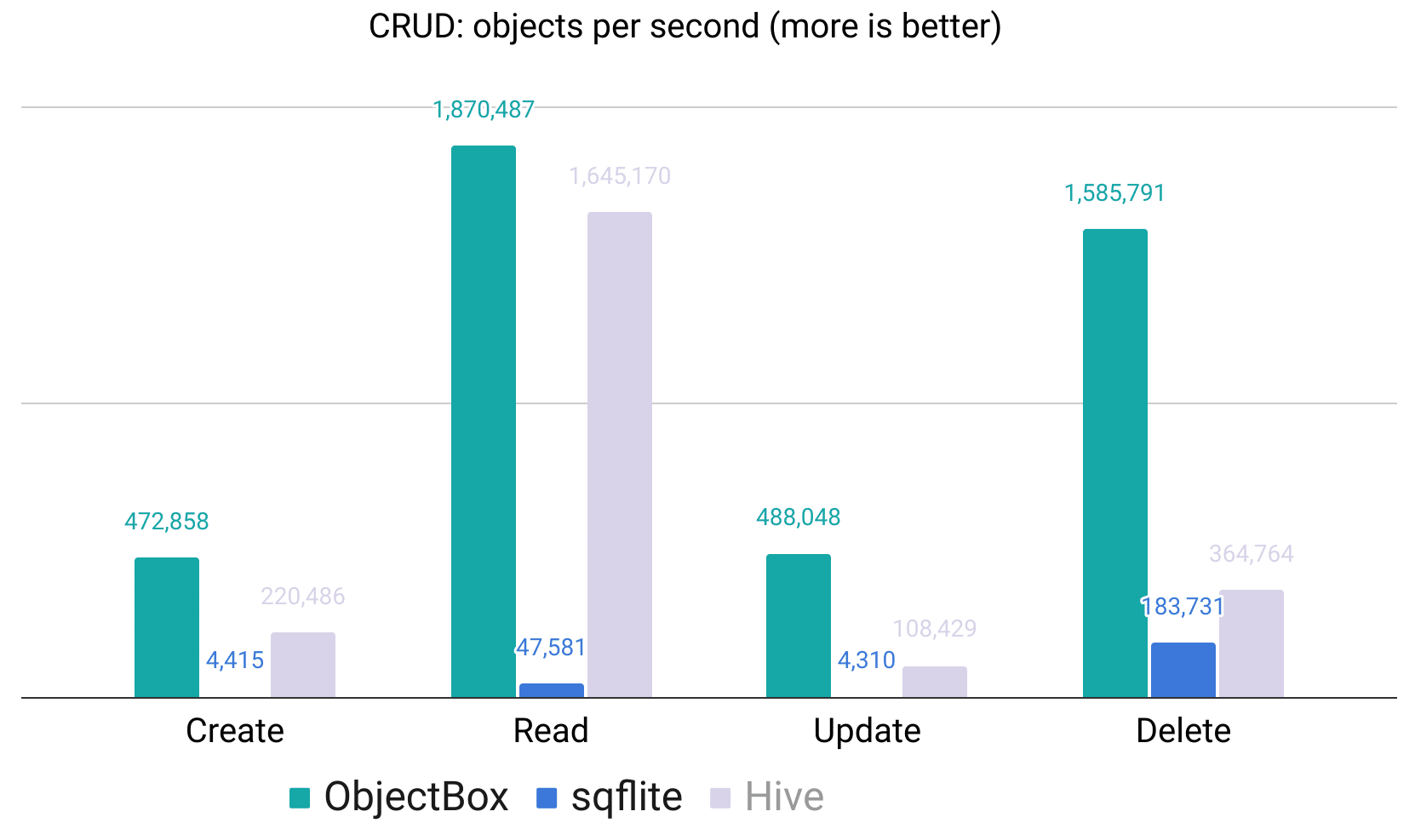
Taken from: https://github.com/objectbox/objectbox-dart/tree/main/objectbox#flutter-database-performance-benchmarks
In addition, it’s the first on-device Vector Search for mobile, IoT, and other embedded devices. It’s highly performant and empowers you to do on-device RAG or on-device generative AI applications.
If your app needs to be offline first, is used in bad connectivity environments and you need generative AI on-device, this is highly recommended.
Couchbase Lite
Couchbase Lite fits the same category as ObjectBox. It’s an embedded JSON-document database with vector search and peer-to-peer sync for mobile and IoT apps. Couchbase Lite itself is a Couchbase product, but the Dart/Flutter SDK is community-maintained and not an official Couchbase product. The free Community Edition is the default, while vector search, peer-to-peer sync, and encryption require the Enterprise Edition. It also has a much smaller user base than the other options here.
While it’s a NoSQL database, it uses SQL++ for data queries, which enables all the SQL developers to effectively continue to use their knowledge. It also comes with a type-safe builder API.
Realm
Realm is a mobile database designed to replace SQLite and ORMs. It was wildly popular, especially after MongoDB acquired it. The acquisition lead to Realm becoming the first choice for mobile apps using MongoDB on the backend due to automatic data syncing.
Realms API shares a lot in common with how queries, indexes, and transactions work on Mongo.
The bad news here is, Realm SDKs and Atlas Device Sync deprecation was announced in September 2024, and both reached end-of-life on September 30, 2025. Device Sync is gone. There is a community branch for the SDK without the sync feature (version 20.x on pub.dev), but it hasn’t seen a release since September 2025. Because sync was the main reason to use Realm, migration is required. Powersync has a migration guide for exactly this case.
Sembast
Sembast labels itself as “Yet another NoSQL persistent store database solution for single process io applications”. Supports DartVM and Flutter.
Web support is available by using sembast_web package and it can also work on top of SQLite by using sembast_sqflite package.
It’s particularly well-suited for medium-sized applications that need flexibility without the complexity of SQL. The database supports encryption, compound queries, and automatic data type handling, though it may not match the raw performance of Isar or ObjectBox for large datasets.
Making the Choice
With all these options, it’s hard to make a choice. To make it simpler for you, I’ve made a flow chart that should help you make the decision.
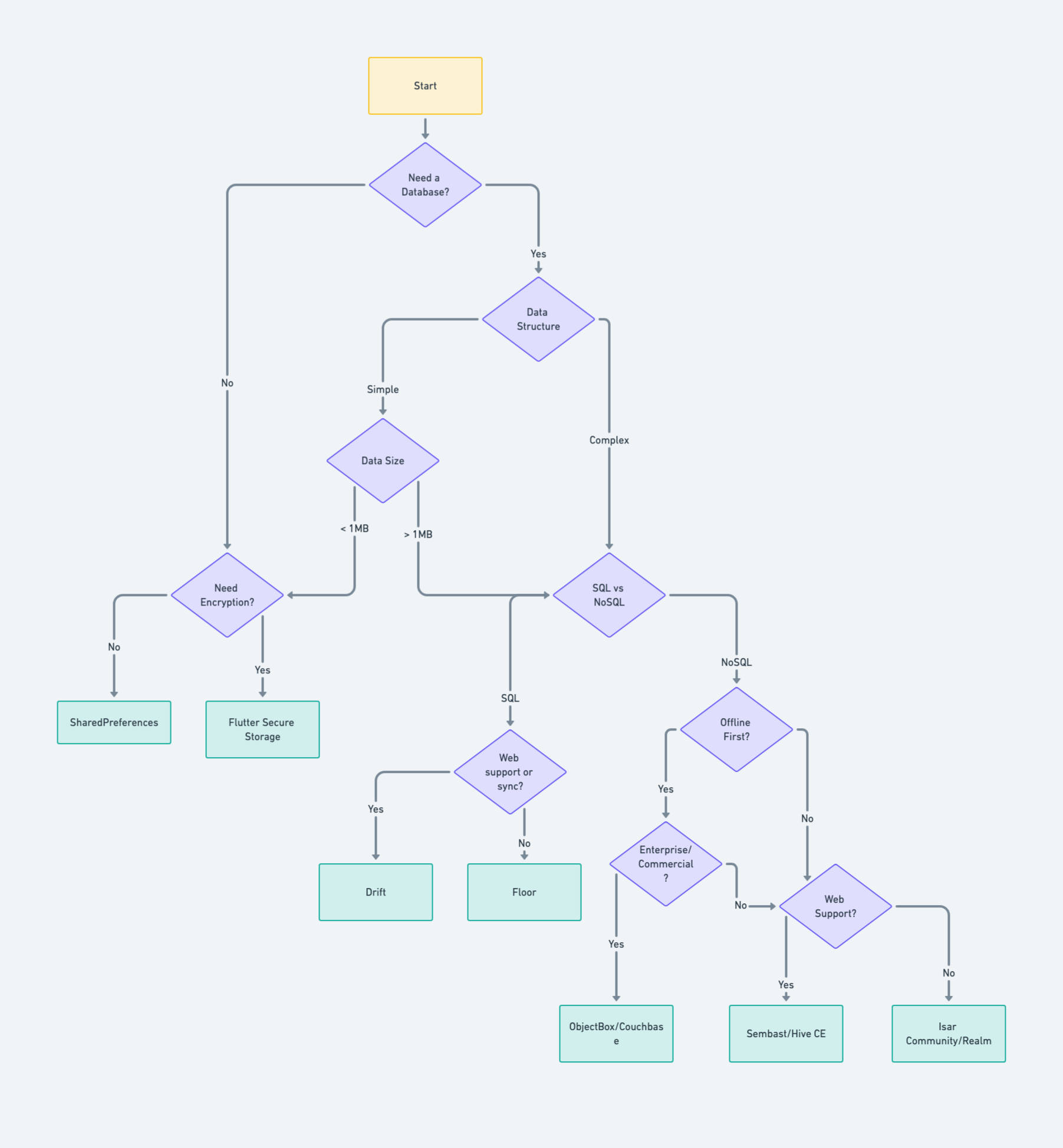
2026 note: Floor hasn’t been updated since 2024, so take Drift on the SQL side even without web or sync. On the NoSQL side without web, Isar Community and Realm are no longer good picks for new projects. Use Hive CE (it works fine without web too) or ObjectBox instead.
There are some considerations that are not built into the chart:
-
Drift is a default choice and the right one for most projects due to extensive documentation and capabilities
-
Hive Community edition is the simplest solution, perfect for prototyping and simple requirements, and offers web support
-
Isar is a worse version of Hive, in my opinion, due to Rust core and the author’s radio silence, not recommended for new projects. The community fork only does bug fixes
-
Realm doesn’t feature sync with Mongo anymore and the community version is dormant, not recommended for new projects
-
ObjectBox’s database is free, but its core is closed-source and sync is paid. Couchbase Lite’s advanced features (vector search, P2P sync, encryption) need the paid Enterprise Edition
-
Shared Preferences and Flutter Secure Storage are more than enough if you only want to save super simple things or store them temporarily
The last thing I want to mention is offline-first apps. ObjectBox and Couchbase come with sync built-in (as paid features). For everybody else, you can use Powersync or build your own solution. Powersync can be used with Drift, and I covered that setup in Building Local-First Flutter Apps with Riverpod, Drift, and PowerSync.
Conclusion
When choosing a local database for your Flutter application, consider your specific needs rather than following trends. With its robust documentation and SQL capabilities, Drift is a reliable choice for most projects.
If you need something simpler, Hive Community Edition offers a straightforward solution with web support. For enterprise-level offline-first applications, ObjectBox and Couchbase Lite provide built-in sync capabilities, though sync is a paid feature for both. Alternatively, you can implement offline synchronization with solutions like Powersync, which integrates well with Drift.
Remember that sometimes the simplest solution, Shared Preferences or Flutter Secure Storage, might be all you need.
If you found this useful, like and follow me for more content like this. To learn when new articles are published, follow me on Twitter and LinkedIn.